
3DCeram open-up UK market for Technical Ceramics
3DCeram are looking at the UK market for the next growth phase in their business. As the UK have many specialist Space, Aerospace, Electronics and


Touch is a motorized device that applies force feedback on the users’ hand, allowing them to feel virtual objects and producing true-to-life touch sensations as users manipulates on-screen 3D objects. Leading companies integrate Touch haptic devices into their work to achieve compelling solutions using the realistic sense of touch.
You can use Touch haptic devices in diverse applications including simulation, training, skills assessment, rehearsal, virtual assembly, robotic control, collision detection, machine interface design, rehabilitation, mapping, and more.
When used with the OpenHaptics® developer software toolkit, the Touch allows developers to design and deploy haptic programs rapidly, do mash-ups into existing applications, try out new ideas, and create haptically-enabled products.

For 3D modeling and design, surgical training, virtual assembly, and other procedures that require a higher degree of precision, Touch X is an easy-to-use and affordable option!
Touch X haptic devices allow a user to feel 3D on-screen objects by applying force feedback on the user’s hand, and the Touch X delivers expanded, true-to-life sensations with a more fluid feel and lower friction. Its durability, affordability, and accuracy make the Touch X haptic device ideal for commercial, medical, and research applications, especially when compactness and portability matter.
Leading OEMs choose the Touch X and integrate it into their products in a number of interactive virtual environments such as surgical simulators and machine component visualization.

Create a compelling user experience for your customers. OpenHaptics® enables users to go beyond working with a 2D mouse in your applications to interacting with and manipulating objects in a realistic, intuitive way. Allow users to feel objects in a virtual 3D scene, making skills easier to learn. Give your customers true 3D navigation and direct interaction in a way that makes them more productive and adds a “wow” factor to your application.
The OpenHaptics Developer Edition enables software developers to add haptics and true 3D navigation to a broad range of applications including 3D design and modeling, medical, games, entertainment, visualization, and simulation. This haptics toolkit is patterned after the OpenGL® API, making it familiar to graphics programmers and facilitating integration with OpenGL applications. Using the OpenHaptics toolkit, developers can leverage existing OpenGL code for specifying geometry and supplement it with OpenHaptics commands to simulate haptic material properties such as friction and stiffness.
The extensible architecture enables developers to add functionality to support new types of shapes. It is also designed to integrate third-party libraries such as physics/dynamics and collision-detection engines as found in Unity or Unreal Engine. The OpenHaptics toolkit supports the range of 3D Systems haptic devices, from the low-cost Touch™ to the Touch X™ haptic device to the larger Phantom® Premium™ haptic devices. The OpenHaptics toolkit supports Microsoft® Windows® 10 and 11 and Linux®.
OpenHaptics Developer Edition is a comprehensive toolkit that allows software developers to integrate haptic feedback and true 3D navigation into a wide range of applications. These include 3D design and modelling, medical and surgical simulation, research and education, games and entertainment, and visualisation and training simulators.
Modelled on the OpenGL® API, OpenHaptics is immediately familiar to graphics programmers and straightforward to integrate into existing OpenGL based applications. Developers can reuse their current geometry definitions and enhance them with OpenHaptics commands to simulate material properties such as friction, stiffness and force feedback.
This creates a seamless blend of visual and tactile interaction, allowing users to directly touch, feel and manipulate virtual objects.
A haptic device allows users to interact with digital content through the sense of touch. Rather than simply clicking or viewing objects on screen, users experience forces, textures and resistance in real time.
Haptic devices from 3D Systems support advanced research, design and simulation workflows by enabling precise 3D positioning and navigation, realistic force feedback, improved motor skill learning, and more natural interaction with complex models.
These capabilities are especially valuable in applications where precision, realism and spatial understanding are critical.
3DCeram are looking at the UK market for the next growth phase in their business. As the UK have many specialist Space, Aerospace, Electronics and

INTAMSYS Launches the FUNMAT PRO 310 APOLLO: Redefining Continuous Production with High-Speed, High-Strength PEEK & PAEK 3D Printing Over the past decade, FFF 3D printing

Cold Metal Fusion (CMF) now available on the Sinterit Lisa X – Accessible Metal 3D Printing for Engineers Metal Additive Manufacturing has traditionally been associated
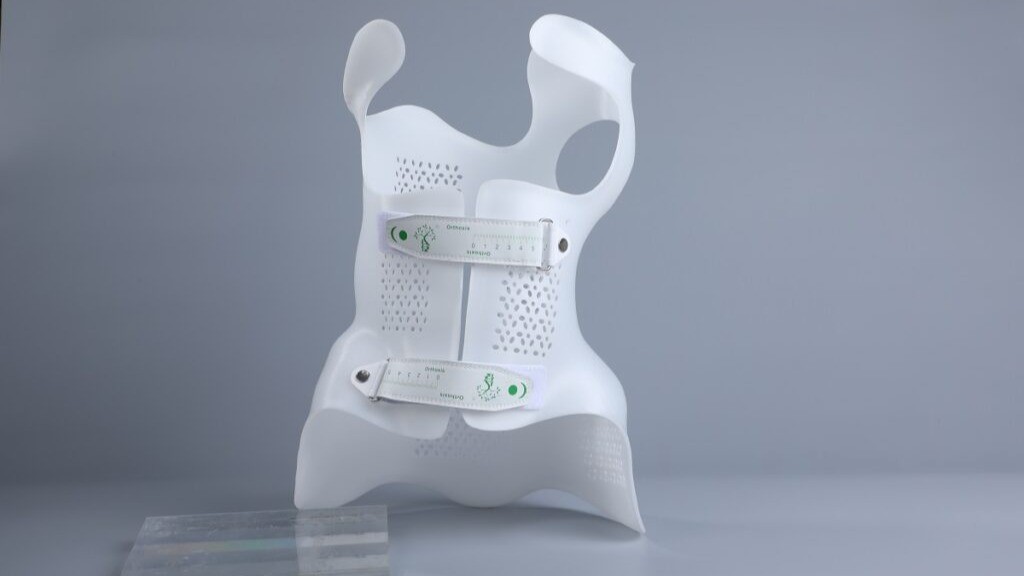
3D Printed Scoliosis Braces Transforming Modern Orthotic Care Scoliosis is a spinal condition defined by an abnormal sideways curvature of the spine, often developing during
Touch™ Haptic Arm is a mid-range, professional haptic device used in research, 3D modelling and OEM applications Touch is a motorized device that applies force